
Amstrad PCW 8256
The affordable Word Processor that took over Europe
What is the Amstrad PCW 8256?

The Amstrad PCW 8256, released in 1985, was one of the most successful and practical computers of the 1980s.
Designed as a complete, affordable word-processing system, it came with everything you needed in one box: the computer, monitor, printer, and software.
Unlike many home computers of the era, the PCW wasn’t built around games. Instead, it focused on real work - writing letters, essays, books, and business documents.
For thousands of people across the UK and Europe, the PCW 8256 was their first serious computer.
Amstrad PCW8256 Specifications
- Release year: 1985
- CPU: Zilog Z80A at 4 MHz
- RAM: 256 KB
- Display: 9-inch monochrome monitor (green or amber)
- Storage: Single 3-inch floppy drive (180 KB disks)
- Operating system: CP/M Plus
- Bundled software: LocoScript word processor
- Printer: Dot Matrix printer included
Why the PCW 8256 became so popular
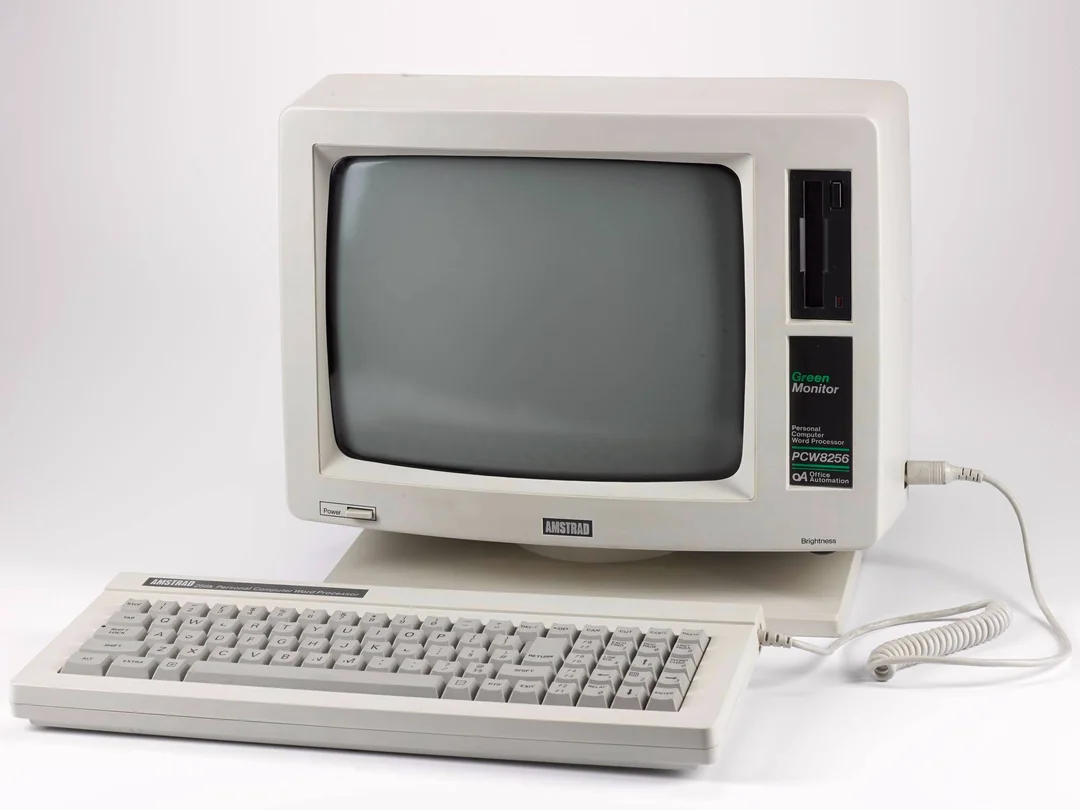


All-in-one simplicity
The PCW was sold as a complete word-processing package:
- Computer
- Monitor
- Printer
- Software
You didn’t need to buy extra parts or learn complicated setup procedures. You could unpack it and start typing within minutes.
Affordable for home and small business
At the time, business computers like the IBM PC were expensive. The PCW offered:
- Professional word processing
- Reliable printing
- Easy-to-use software
- All at a fraction of the cost.
LocoScript: the “killer app”
The included LocoScript word processor was:
- Fast and responsive
- Menu-driven and easy to learn
- Designed specifically for the PCW hardware
For many users, the PCW wasn’t just a computer - it was a dedicated writing machine.
PCW 8256 vs PCW 8512
Amstrad later released an upgraded model.
FEATURE
PCW8256
PCW8512
RAM
Disk Drives
Storage Capacity
Target User
256 KB
Single
Lower
Home / Entry Business
512 KB
Dual
Higher
Heavy Office User
Both models used the same core design and software.
Storage and the famous 3-inch disks
The PCW used 3-inch floppy disks, which were:
- Smaller than the common 5.25-inch disks
- Sturdy, hard-cased, and double-sided
- Unique to Amstrad systems
While reliable, they later became harder to find than standard disk formats.
Gaming and educational software
Although not a gaming system first, the PCW could still run:
- Text-based adventure games
- Puzzle and strategy titles
- Educational programs
- CP/M productivity software
For many students, it was a serious learning machine rather than an arcade-style computer.
How to use an Amstrad PCW today
Option 1: Original hardware
Collectors still use real PCW machines. Common maintenance includes:
- Checking the power supply
- Cleaning disk drives
- Replacing ageing capacitors
- Testing the printer mechanism
Option 2: Emulation
Emulators let you experience the PCW without vintage hardware:
- Download a PCW emulator for your platform.
- Load a CP/M or LocoScript disk image.
- Start typing or exploring software.
Emulation is ideal for:
- Learning retro word processing
- Exploring CP/M software
- Educational demonstrations

Buying guide: what to check
If you’re considering a PCW 8256, look for:
- Stable boot: system loads without errors.
- Disk drive condition: reads disks reliably.
- Monitor brightness: clear, sharp text.
- Keyboard response: no dead keys.
- Printer condition: dot matrix mechanism intact.
If possible, buy a tested or refurbished unit.
PCW 8256 legacy
The PCW series:
- Sold millions of units across Europe.
- Made word processing affordable for ordinary households.
- Became a common sight in homes, schools, and offices.
- Helped define the idea of the home office computer.
For many people, the PCW was the machine on which they wrote their first:
- School essays
- Business letters
- University assignments
- Book manuscripts
Amstrad PCW 8256 FAQ
What does PCW stand for?
PCW stands for Personal Computer Wordprocessor, reflecting its main purpose.
Was the PCW 8256 good for games?
It could run some games, but it was primarily designed for word processing and business use.
What operating system did it use?
The PCW ran CP/M Plus, a popular business operating system in the 1980s.
Can you still use a PCW today?
Yes. You can restore original hardware or use an emulator on modern computers.
Explore more retro computers If you enjoyed learning about this system, you might also like:
- Apple Macintosh Classic II
- Atari 2600 Woody
- Amstrad CPC464
- Amstrad PCW8256
- BBC Model B
- Commmodore Vic 20
- Commodore 16
- Commodore Plus/4
- Commodore 64
- Commodore Amiga 500+
- Commodore Amiga 2000
- Commodore Amiga 1200
- Texas Instruments - TI994a
- ZX Spectrum 48k
- ZX Spectrum 128k