BBC Micro Model B
The iconic British computer that taught a generation to code
What is the BBC Micro Model B?
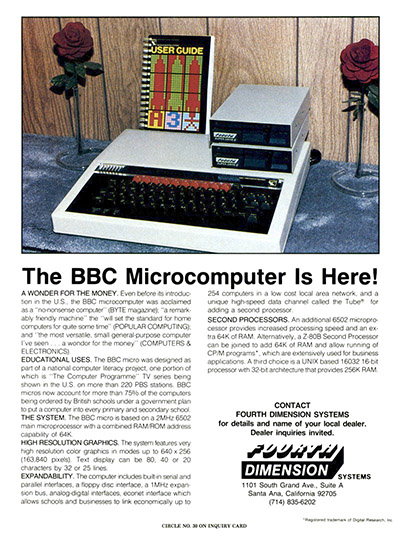
The BBC Micro Model B (often called the BBC Micro or Beeb) is a legendary 8-bit computer launched in 1981 by Acorn Computers.
It was commissioned for the BBC’s Computer Literacy Project, aiming to make computing approachable through TV, books, and a machine you could program at home or in the classroom.
What made the Model B special wasn’t just its speed for the time - it was the combination of solid build quality, excellent documentation, and BBC BASIC in ROM, which meant you could turn it on and start learning immediately.

BBC Micro Model B specs (quick reference)
CPU
6502 @ 2 MHz
RAM
32 KB
ROM
BBC BASIC + MOS
Storage
Cassette (standard), floppy (optional)
Graphics
Multiple screen modes (text + bitmap)
Sound
Programmable sound
Expansion
User port, printer, analogue, Econet, +
Era
UK schools & home computing boom
Why the BBC Micro became a legend

In the early 1980s, many computers were either toy-like or intimidating. The BBC Micro hit a sweet spot: serious enough for education, friendly enough for beginners, and expandable enough for enthusiasts. It’s also part of the origin story of modern computing - Acorn’s later work helped lead to the ARM processor family, now found in countless devices.
Ports, expansion & the “do anything” vibe
A big reason people still love the Model B is how connected it feels. With multiple ports and expansion options, it’s the kind of machine that invites tinkering—perfect for retro-hardware projects, electronics, or simply exploring how computers used to work.
Micro Live was a BBC2 TV series that was produced by David Allen as part of the BBC's Computer Literacy Project, and followed on from earlier series such as The Computer Programme, Computers in Control, and Making the Most of the Micro.
The first programme was a one-off two-hour-long special, broadcast on Sunday 2 October 1983 as Making the Most of the Micro Live.
A second season of Micro Live launched in 1985 as a weekly half-hour programme and was followed by a third series of weekly half-hour shows in 1986. The series broadcast its last programme on 28 March 1987.
Classic games & software worth trying
The BBC Micro library includes everything from clever arcade conversions to educational titles that still feel charming today. If you’re exploring for the first time, look for a mix of action, puzzles, and “learn by doing” programs.
- Arcade & action: fast reflex games that show off tight 8-bit design.
- Adventures & puzzles: text/graphic hybrids that reward curiosity.
- Educational: programs that teach logic, maths, and programming concepts.
Tip: If you run an emulator, start with a curated “starter pack” of public-domain or legally distributed titles.

Chuckie Egg

Repton 2

Revs
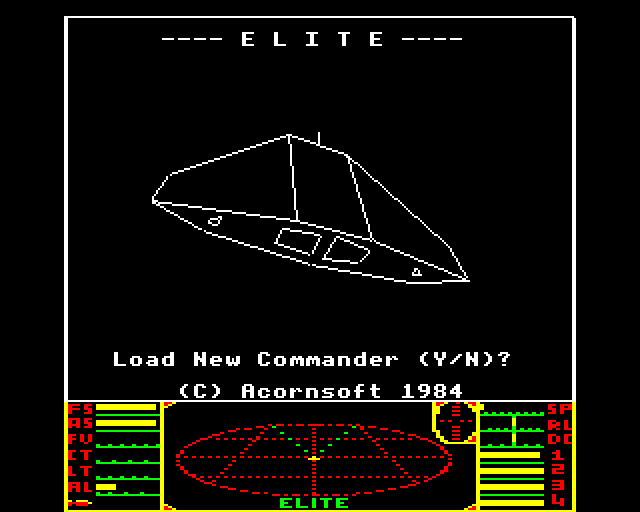
Elite
How to emulate the BBC Micro (and why it’s worth it)
Emulation is the quickest way to experience the BBC Micro Model B without sourcing vintage hardware. With an emulator you can run classic software, write BBC BASIC, and save snapshots instantly - great for experimenting and learning.
- Pick a reputable BBC Micro emulator for your platform (Windows/macOS/Linux/mobile).
- Start with a known-good software image set (legally shared where possible).
- Try BBC BASIC: type a short program, save it, and build from there.
Want an engaging “first program” for your page? Here’s a tiny snippet visitors can copy into an emulator:
10 MODE 2
20 PRINT "HELLO FROM THE BBC MICRO!"
30 FOR I=1 TO 2000:NEXT
40 GOTO 20

BBC EMULATOR (Virtualbeeb 0.0.1)
< Try me >
Buying & restoration checklist
If you’re shopping for a BBC Micro Model B, you’ll see a wide range of conditions—from pristine to “project box.” Here’s what to check so you don’t end up with a surprise repair bill:
- Power supply & stability: does it boot reliably and stay on?
- Video output: clean signal, no heavy interference, stable text.
- Keyboard: consistent key response (no sticky or dead keys).
- Ports: visible corrosion or damage around connectors?
- Sound: distortion-free tones (where possible to test).
- Evidence of prior work: neat repairs are fine; messy soldering is a red flag.
My BBC Model B
Read my blog about how I purchased my own BBC model B for my Retro Room.

BBC Micro Model B FAQ
Is the BBC Micro Model B good for beginners today?
Yes - especially through emulation. BBC BASIC is approachable, and the machine’s constraints make it a fun way to learn fundamentals: loops, variables, graphics modes, and simple game logic.
What’s the difference between the BBC Micro Model A and Model B?
The Model B is the more popular configuration with more memory and expandability. It’s the version most people remember from schools and home setups.
Do I need original hardware to enjoy BBC Micro games?
Not at all. Emulators can deliver the authentic experience with modern conveniences like save states, quick loading, and easy screenshot capture.
Explore more retro computers If you enjoyed learning about this system, you might also like:
- Apple Macintosh Classic II
- Atari 2600 Woody
- Amstrad CPC464
- Amstrad PCW8256
- BBC Model B
- Commmodore Vic 20
- Commodore 16
- Commodore Plus/4
- Commodore 64
- Commodore Amiga 500+
- Commodore Amiga 2000
- Commodore Amiga 1200
- Texas Instruments - TI994a
- ZX Spectrum 48k
- ZX Spectrum 128k